Design a URL shortener that can take a spike of 100M writes a day.
Interview helper · India-first · Pay in ₹
Your wingman for coding interviews.
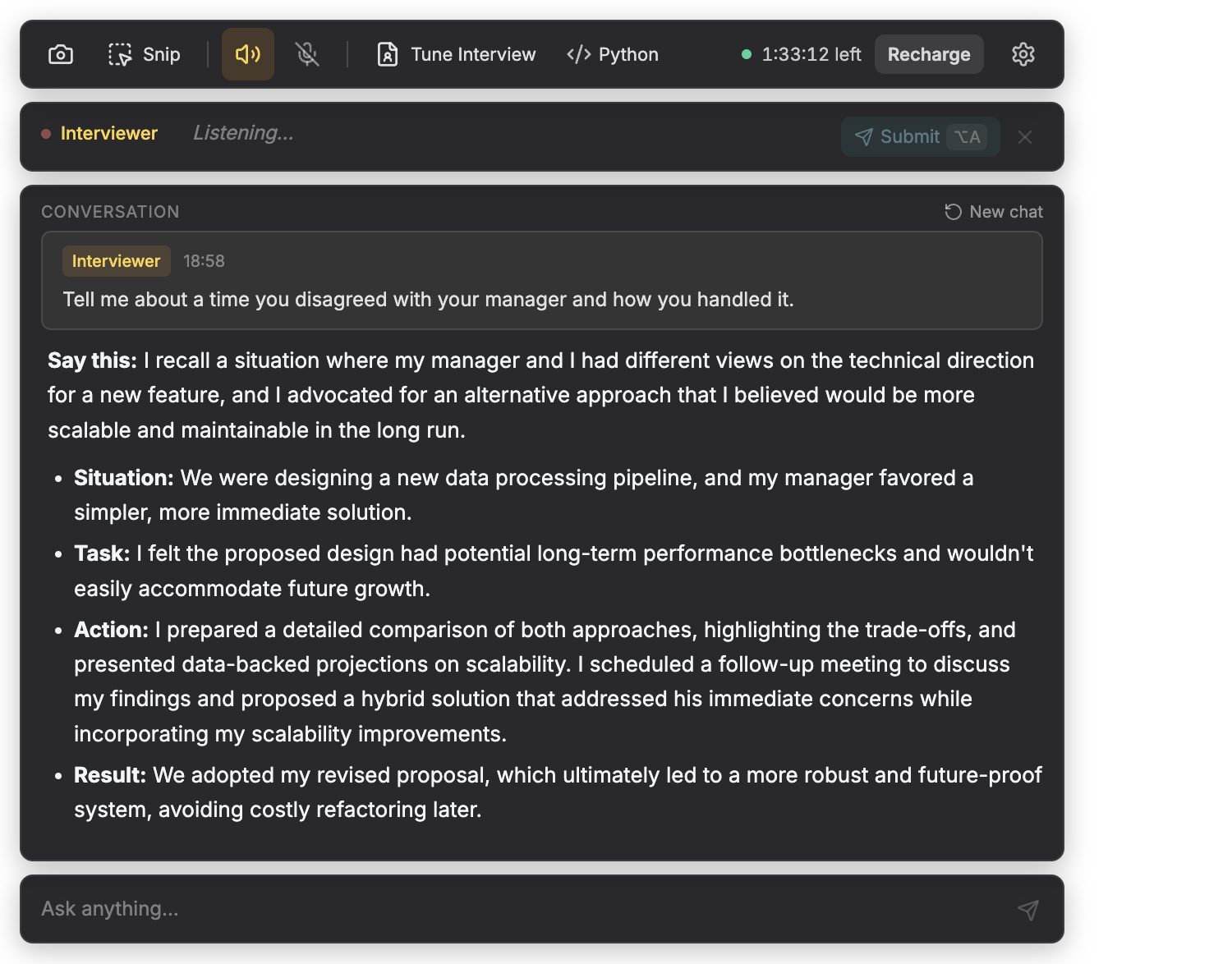
A dark-glass overlay on your desk — not another browser tab. Hears whatever is playing on your computer, helps you answer while you stay in your flow.
- Whole-system audio — Google Meet, Zoom, Teams, YouTube, recorded prep, any tab with sound; not tied to one app
- Structured answers in seconds: say-this line, STAR, code, or a diagram
- Tune Interview locks answers to your resume and job description
- Pay-as-you-use · custom minute top-ups · pay only while the session is active
Copy this user guide to any agent to know about the product and how to use it.
A looped walkthrough of the overlay. Not a recording of the desktop app.
Screenshots + walkthrough
Understand the app
Every screen in the desktop app — sign-in, overlay, Tune Interview, Settings, recharge, and referrals — with plain-language notes on what each control does. Prefer one file for you or an AI assistant? Use the User guide (Markdown download).
In the room
Three moves. Same window.
Helpwing stays a dark glass strip on your desk. You do not tab away from the call.
-
01
Tune the interview
Drop a resume, the company, and the job description. Answers stay inside that story — no invented employers, no borrowed metrics.
-
02
Hear it, snap it, or type it
System audio catches whoever is speaking on your speakers — a live call, a YouTube walkthrough, or a practice video. Screenshot and typed follow-ups land in the same thread.
-
03
Read a short answer out loud
First line you can say. Then STAR, code, or a small diagram. Complexity when it is a coding round. Nothing that sounds like a blog post.
In this build
What the desktop app actually has
Read from the overlay, not from a wishlist. If a switch is not on the command bar, it is not listed here.
-
Whole-system audio
The interviewer row listens to everything your computer plays — video calls (Meet, Zoom, Teams, and the rest), browser tabs, YouTube, local files, whatever has sound. It is not a Meet or Zoom plugin. Mac uses ScreenCaptureKit loopback; Windows uses WASAPI — no BlackHole, no virtual cable. Mic is a separate row, off until you turn it on.
-
Transcript, then submit
Speech lands in the bar so you can read it first. Alt+A sends the interviewer line. Alt+E sends yours. Clear a bad interviewer line with Alt+D or ×.
-
Screenshot and snip
⌘/Ctrl+H queues a full shot. Snip is a drag-rectangle on Mac; Windows and Linux take a full shot instead. Solve with ⌘/Ctrl+Enter.
-
Tune Interview
Resume, company, and job description from the command bar. Answers stay inside that story. No invented employers.
-
Solution language
Python, Java, C++, TypeScript, Go, Rust, SQL, and the rest of the command-bar selector — the language your code answer is written in.
-
Persistent thread
Every turn — screenshot, typed, interviewer, you — appends to one conversation. Survives restarts. New chat is ⌘/Ctrl+R.
-
Custom keyboard shortcuts
Defaults match the cheatsheet below, but every global hotkey is remappable in Settings — screenshot, solve, audio, hide overlay, and the rest. Saved on your machine.
-
Recharge in INR
Packs or a custom minute count. Checkout through Razorpay (UPI, cards, netbanking). No auto-renew. Status bar shows minutes left.
-
Telegram
Join Helpwing on Telegram for tips and release notes. Support stays on support@helpwing.ai.
Same keys on both desks
A cheatsheet that works on Mac and Windows
⌘ on a Mac, Ctrl on Windows. Alt is Alt. These are the defaults on both desks — in the desktop app, open Settings → Keyboard shortcuts to remap any action to your own combo (saved on your machine).
Screenshot
⌘/Ctrl + H
Solve queued shots
⌘/Ctrl + Enter
Show or hide overlay
⌘/Ctrl + B
New chat
⌘/Ctrl + R
Send the ask box
⌘/Ctrl + K
System audio on/off
Alt + Q
Submit interviewer line
Alt + A
Clear interviewer line
Alt + D
Microphone on/off
Alt + W
Submit your line
Alt + E
Click a row to preview the action. Keys are identical on Mac and Windows except the command glyph.
Pay as you use
Custom pricing options available. Pay for the time only you are using.
Transparent pricing
Pay once. No auto-renew.
Start with 15 free minutes. Packs from ₹299, or a 30-day Pro pass at ₹2,399. Custom top-ups from ₹5/min in the app. We do not store a card for a second charge.
- No Auto-Renew Ever
- 18% GST Included
- UPI · Cards · Netbanking
- 7-Day Refund on Unused Minutes
Custom top-up
Choose how many minutes to pay for
Same flow as Recharge in the desktop app — pick any whole minute count, pay once, use when your session is active.
Published standard pricing in INR. GST included. No auto-renew.
Estimate the month
The picker chooses the cheapest cover, even when that is a smaller pack.
Recommended
Value Pack · ₹1,199
About ₹300 per interview, with minutes left over.
● Free
● Needed
● Left
180 minutes needed
Is Helpwing free to start?
Yes. New accounts get 15 welcome minutes on email sign-in. No card.
Does it understand Indian English and Hinglish?
Yes. The speech path is tuned for Indian English and the mixed technical phrasing used in Indian hiring loops.
Can I use it in a live interview?
Only where the employer allows AI. Mock practice is always fine. Live assist is not for exams or proctored tests. Read the company policy first.
Can I use it for college exams or online tests?
No. Helpwing is an interview helper for prep and allowed live rounds — not proctored tests, hiring exam screens, or recruitment assessments. See responsible use.
Does any plan auto-renew?
Never. Every purchase is one-time via UPI, netbanking, or card. No UPI mandate, no stored-card subscription.
Does it only work in Zoom or Google Meet?
No. Helpwing taps system audio — whatever is playing on your machine. Live calls, YouTube, a recorded lecture, or any browser tab with sound all show up in the transcript bar the same way. There is no per-app integration to install.
Which operating systems are supported?
The Mac app runs on macOS 14.2+ (Apple Silicon and Intel). A Windows 10/11 build is coming — leave your email on the download page.
Get started
Get the desktop app
Mac is ready today. Windows is in the shop — leave your email on the download page.
Install on Mac
macOS 14.2+. Overlay, system audio, screenshots, and the conversation thread.
Download for MacUser guide
Copy this user guide to any agent to know about the product and how to use it.
User guideGet the Windows note
Same overlay, WASAPI loopback, no virtual cable. We will mail you when the installer is up.
Windows coming soon